HubSpot Integration: Real Challenges and How We Solved Them
Integrating HubSpot into an existing enterprise platform looks straightforward on paper. HubSpot provides APIs, OAuth authentication, and decent documentation. But when you try to build a production-ready import/export integration, the real challenges start to appear.
In this post, I’ll share:
- The challenges we faced
- The problems that came up in real usage
- What approach we took
- How we solved those problems cleanly
Why We Needed a HubSpot Integration
Our platform is a data migration and synchronization system used to move data between multiple enterprise systems reliably. Over time, we’ve built stable, production-grade integrations with several external platforms—CRMs, accounting systems, and internal ERPs—using a common import/export framework.
HubSpot became a natural next step. Many of our intended customers use HubSpot as their primary CRM, while continuing to run core business workflows—billing, operations, reporting—inside other systems. To support these workflows, HubSpot data needs to move in and out of our platform safely, repeatedly, and at scale.
The Challenge
We needed to integrate HubSpot into an existing data migration platform built on Java and Play Frameworks. The platform already supported other external systems, so the HubSpot integration had to:
- Support OAuth authentication
- Handle import and export
- Work with large datasets
- Be retry-safe
- Avoid duplicate data
- Fit into an existing ApiImport / ApiExport architecture
This was not a one-time sync. These jobs run multiple times, sometimes partially fail, and must be safe to retry.
Problems We Faced
1. OAuth Token Expiry
HubSpot access tokens expire. During long import jobs, tokens could expire mid-process, causing API failures.
Problems:
- Token expired during paging
- Multiple refresh attempts
- Job failure after partial success
2. Strict Property Naming Rules
HubSpot API only accepts lowercase property names.
For example:
- lastName (Incorrect)
- lastname (Correct)
Sending camelCase fields caused frequent 400 VALIDATION_ERROR responses.
3. Finding the Right Unique Identifier
At first glance, email looks like a good unique key for contacts. But in reality:
- Emails can change
- Contacts can be merged
- Emails are not guaranteed to be unique
We needed a true, immutable identifier.
4. Import Mapping Complexity
HubSpot sends data like: firstname, lastname, jobtitle
Our internal system expects: firstName, lastName, jobTitle
Passing HubSpot fields directly caused:
- Broken mappings
- Silent failures
- Dirty internal data
5. Full Imports Every Time
Importing all records every time is risky:
- Slower performance
- Higher API usage
- Rate-limit issues
- Difficult retries
Incremental imports were mandatory.
6. Configuration Errors
Some imports failed with errors like:
Unsupported HubSpot object category
The issue was not the API — it was missing or incorrect mapping metadata.
What We Did
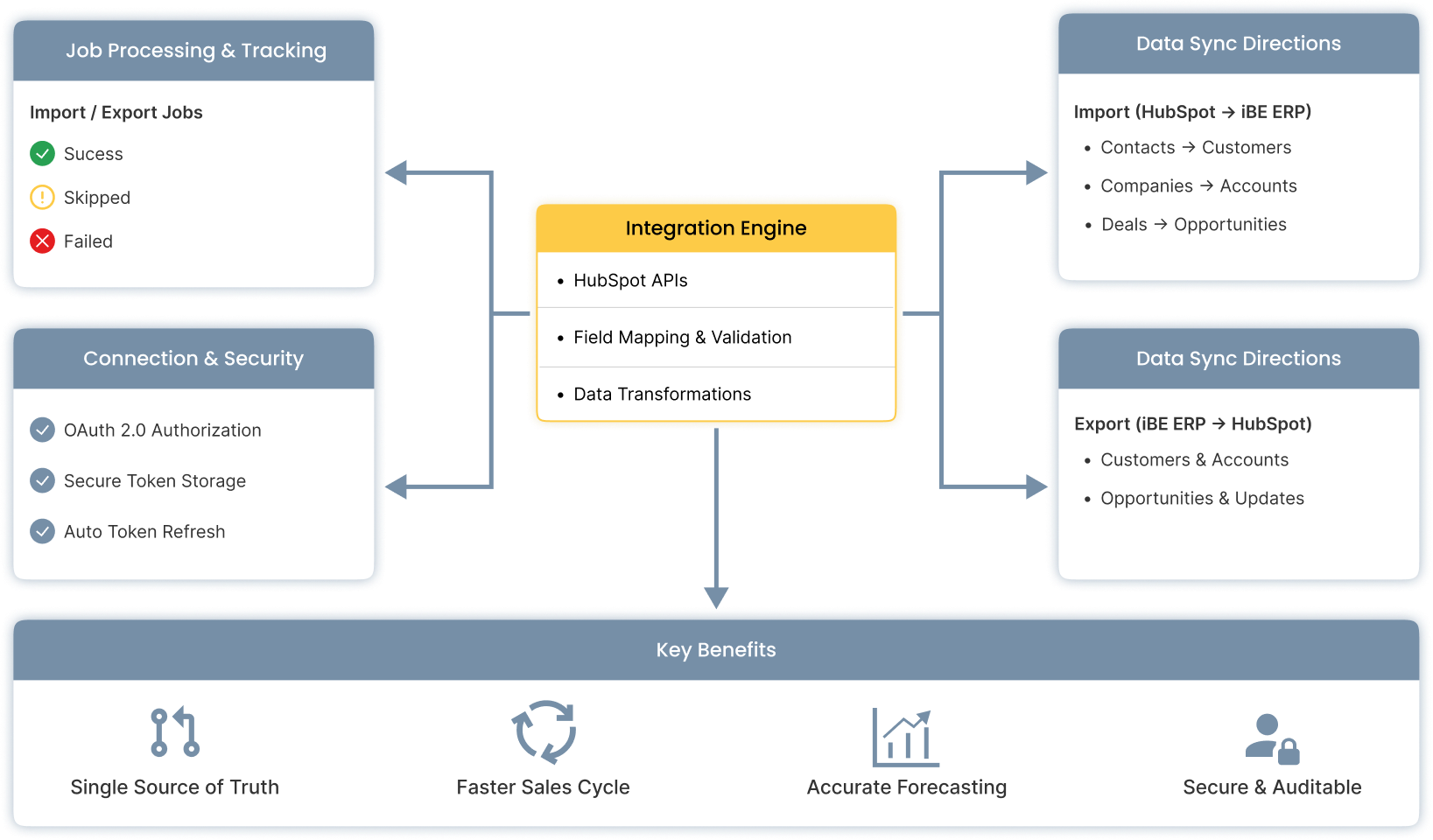
Our integration platform already followed a clear pattern: every external system is treated the same way. Authentication is abstracted, imports and exports are isolated, retries are expected, and data integrity is non-negotiable.
Instead of bending the platform to fit HubSpot, we decided to make HubSpot conform to these existing principles. Instead of patching issues one by one, we stepped back and decided to:
- Treat HubSpot like any other enterprise system
- Keep HubSpot logic isolated
- Make imports and exports idempotent
- Fail early for configuration problems
- Never allow silent data corruption
How We Solved It
1. Centralized OAuth Token Handling
We implemented a token refresh helper:
- Refresh tokens once per job
- Refresh before expiry
- Fail clearly if refresh fails
This made long-running jobs stable.
2. Explicit Field Mapping (Import and Export)
We introduced a strict mapping layer.
Export example
firstName → firstname
lastName → lastname
Import example
firstname → firstName
lastname → lastName
No raw HubSpot fields are allowed into the internal domain model.
3. Correct Unique ID Strategy
We standardized on:
hs_object_id → externalId
externalSource = HUBSPOT
Why this works:
- It never changes
- It is never reused
- It survives deletes and merges
This made imports retry-safe and duplicate-free.
4. Required Field Validation
Before saving data:
- Validate required fields (like email)
- Skip invalid records
- Log warnings instead of failing the entire job
One bad record should never stop thousands of good ones.
5. Incremental Imports
We stored metadata like: lastSuccessfulImportAt
Then filtered HubSpot data using: lastmodifieddate > lastSuccessfulImportAt
Benefits:
- Faster imports
- Fewer API calls
- Easy resume after failure
6. Strict Mapping Configuration
We enforced clear rules: primaryBusObjCat = Contact / Company / Deal / Ticket
If missing:
- Import fails immediately
- Clear error message
- No hidden behavior
This saved a lot of debugging time.
Final Outcome
After these changes, the HubSpot integration became:
- Stable in production
- Safe to retry
- Configuration-driven
- Easy to extend
- Predictable under failure
Most importantly, it protects data integrity.
Key Takeaways
- OAuth is easy; OAuth at scale is not
- Never trust external field names
- Always use system-generated IDs
- Mapping configuration matters as much as code
- Incremental imports are essential for SaaS systems
Conclusion and What’s Next
HubSpot integration is not difficult—but doing it right in a production, enterprise environment requires discipline. OAuth, APIs, and mappings are only part of the problem. The real challenges appear when jobs run long, fail midway, retry automatically, and still must preserve data integrity.
By treating HubSpot like any other enterprise system, enforcing strict field mappings, and designing imports and exports to be idempotent from the start, we built an integration that behaves predictably under real-world conditions. Token expiry, partial failures, and configuration errors are no longer edge cases—they are expected scenarios.
With this foundation in place, our next steps include supporting more HubSpot objects and associations, improving bidirectional sync and conflict handling, introducing smarter incremental imports, and enhancing observability with better job-level and record-level insights.
The goal isn’t just to connect to HubSpot, but to make it a reliable part of complex enterprise workflows. Solve these problems early, and your integration will scale with confidence—not surprises.